



0070. CommonJS
- 1. 🎯 本节内容
- 2. 🫧 评价
- 3. 💡 思维导图
- 4. 🤔 CommonJS 是什么?
- 5. 🤔 CommonJS 规范的具体内容是?
- 6. 🤔 入口文件是什么?
- 7. 🤔 CommonJS 模块加载流程是?
- 8. 💻 demos.1 - 模块入口
- 9. 💻 demos.2 - 模块导出
- 10. 💻 demos.3 - 模块导入
- 11. 💻 demos.4 - 模块缓存
- 12. 💻 demos.5 - 模拟
require - 13. 💻 demos.6 - 小练习 - 实现斗地主洗牌发牌逻辑
- 14. 🔗 引用
1. 🎯 本节内容
- CommonJS 规范的原文
- 入口文件的概念和书写位置
- CommonJS 模块导出的基本写法
- CommonJS 模块路径解析细节
- CommonJS 模块的同步加载机制
- CommonJS 模块的缓存机制
require的实现原理简介
2. 🫧 评价
源码层面的一些实现细节,可以参考 DeepWiki - NodeJS 文档。
cjs loader 的核心原理封装在了 NodeJS 的 lib/internal/modules/cjs/loader.js 模块中,对具体的细节感兴趣的话,可以打开瞅瞅,代码量一共 2k+ 行左右。
3. 💡 思维导图
4. 🤔 CommonJS 是什么?
💡 维基百科的定义
CommonJS 是一个项目,其目标是为 JavaScript 在网页浏览器之外创建模块约定。创建这个项目的主要原因是当时缺乏普遍可接受形式的 JavaScript 脚本模块单元,模块在与运行 JavaScript 脚本的常规网页浏览器所提供的不同的环境下可以重复使用。
CommonJS 是一套为服务器端 JavaScript 应用(NodeJS 应用)设计的模块化标准。
可以说 CommonJS 是一种 JavaScript 环境中模块化编程的规范,它定义了一套模块化导入和导出的语法和机制,旨在解决 JavaScript 在模块化方面的缺陷。
为了方便,我们会将 CommonJS 简称为 CJS。
5. 🤔 CommonJS 规范的具体内容是?
5.1. Modules/1.0
Modules/1.0 这是维基百科上记录的关于 CommonJS 规范的具体描述,NodeJS 的 require / module.exports 就是基于它实现的。
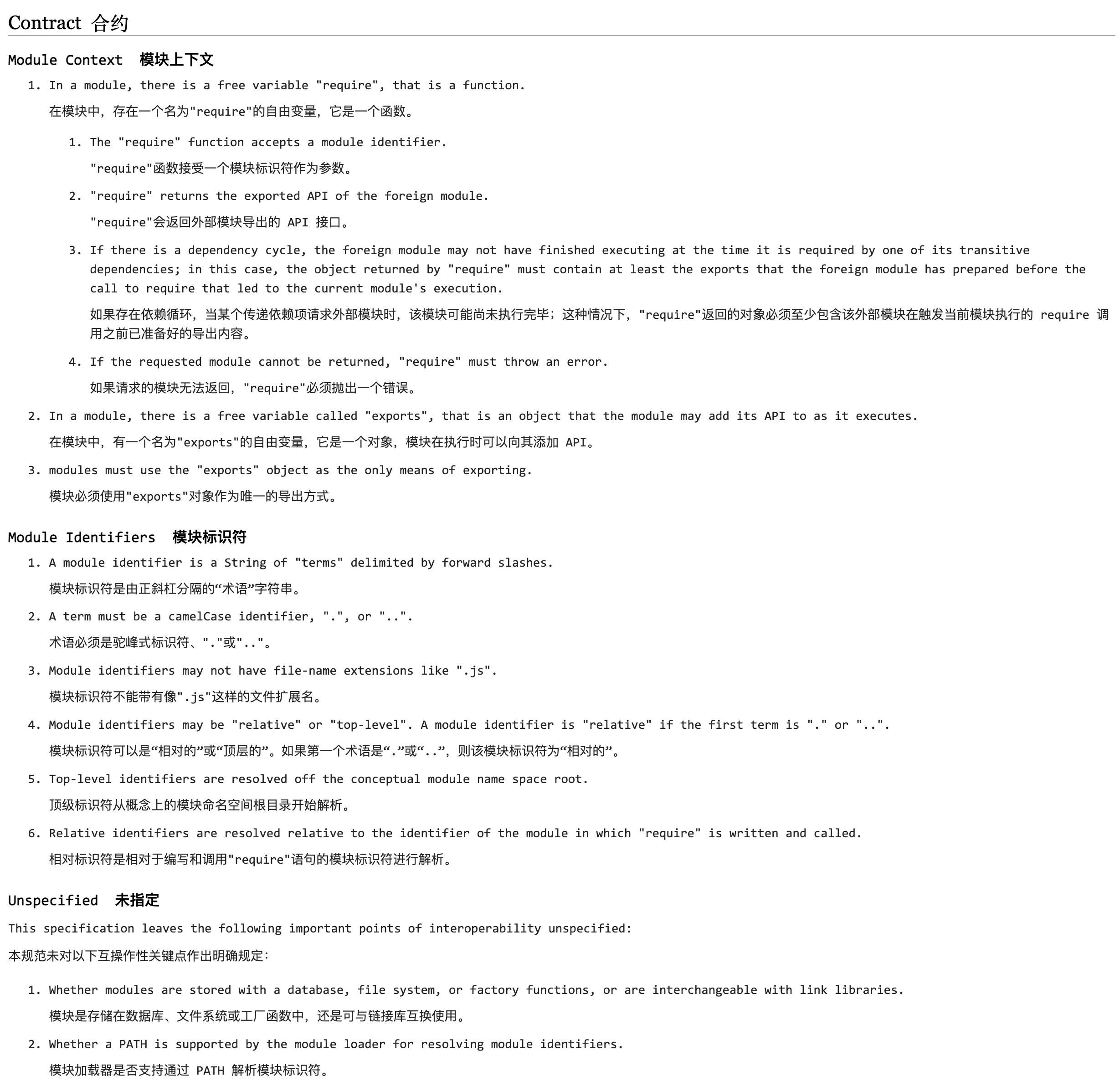
维基百科上记录的这些内容应该算是最权威的了,CommonJS 是一个社区提出的规范,并没有类似 ECMAScript 那样的官方组织。在写这篇笔记时,并没在网上找到对应的官方文档。
通过查看 Modules/1.0 中的内容,你会发现,类似这样的一些技术规范,你很少会看到什么代码块,因为它们只负责描述应该如何如何,而不负责具体实现。落地这些规范,就是 NodeJS 要干的事儿了。
以下内容是对 CommonJS 规范中的一些要点的记录,其中核心有 3 个:
- 模块 -> 一个个文件
- 导入 -> 模块中的
require函数 - 导出 -> 模块中的
exports对象
5.2. CommonJS 模块
在 CommonJS 规范中,一个文件默认就是一个模块,因此,在 NodeJS 中,对于 Module 的定义,也是一样的 👉 一个文件就是一个 Module。
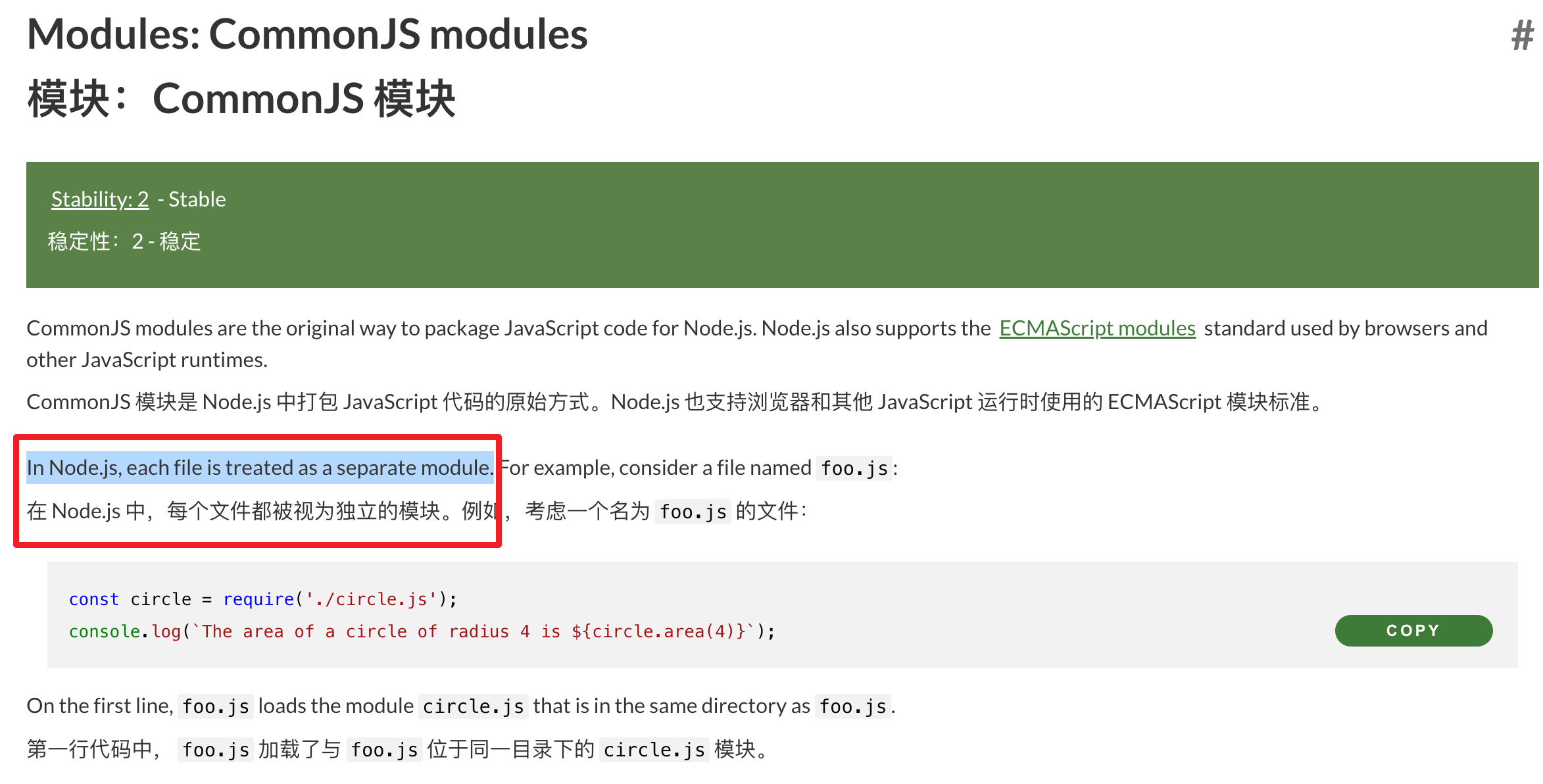
在 CommonJS 模块中,文件内定义的变量和函数都是局部的,不会污染全局作用域。这意味着模块内部的变量、函数等不会影响到其他模块或全局作用域,彼此之间是相互隔离的。
5.3. require 函数
require 是一个函数,用于导入其他模块的导出内容。当你调用 require 并传入一个模块标识符(可以是模块的名称、相对路径或绝对路径),它会返回所请求模块的 exports 对象或 module.exports 指定的值。
5.4. exports 对象
exports 是一个特殊的对象,用于导出模块要暴露出去的 API。模块可以将其内部的函数、对象或值添加到 exports 对象中,使得其他模块可以通过 require 函数访问这些导出的内容。除了使用 exports,还可以使用 module.exports 直接导出一个值,这将覆盖 exports 对象。
6. 🤔 入口文件是什么?
入口文件通常是 index.js 或者由 package.json 中的 main 字段指定的文件,这个入口文件是启动应用时 NodeJS 运行的第一个文件。
一个复杂的应用通常不会把所有的业务逻辑都写在一个文件里,因此入口文件确实就是一个根,它里边儿的代码量其实并不会很多,CommonJS 会根据这个根去分析依赖关系,生成依赖树结构,这棵树的不同分支上存储着不同的不同的业务逻辑,这棵树整体构成了我们所谓的应用。

在 NodeJS 中,有且仅有一个入口文件(启动文件),而开发一个应用肯定会涉及到多个文件配合,因此 NodeJS 需要一套模块化规范来各个模块的导入、导出问题。由于 NodeJS 刚刚发布的时候,前端没有统一的、官方的模块化规范,因此,它选择使用社区提供的 CommonJS 作为模块化规范。
7. 🤔 CommonJS 模块加载流程是?
通过熟悉 CommonJS 模块的加载流程,可以帮助我们理清关于 CommonJS 中的诸多细节。
7.1. 时序图
加载图表中...
这个时序图展示了 CommonJS 模块从 require() 调用到最终返回 module.exports 的完整过程,核心步骤:
- 路径解析 - 将模块标识符解析为绝对路径(模块的唯一标识)
- 缓存检查 - 检查
Module._cache是否已加载过该模块- 命中:直接返回缓存的
module.exports - 未命中:继续后续步骤
- 命中:直接返回缓存的
- 创建模块 - 实例化新的
Module对象并存入缓存 - 读取编译 - 读取源码并用
wrapSafe包装成函数 - 执行导出 - 执行包装函数,设置
module.loaded = true,返回module.exports
7.2. 模块的加载和执行
CommonJS 在加载模块时是同步的。
模块的加载和执行对应上述时序图中的第 4、5 步骤,在这个阶段中,模块内容的读取、包装、执行都是同步进行的。
当调用 require() 函数加载模块时,NodeJS 会阻塞当前代码的执行,直到目标模块被完整地读取、编译、执行完毕并返回 module.exports。
同步加载的优缺点:
- 优点(服务器端):文件系统 IO 速度快,机会不会影响用户体验
- 缺点(浏览器端):会阻塞 UI 渲染,导致页面卡死,对用户体验影响很大
这就是为什么 CommonJS 只适用于 NodeJS 环境,而不适用于浏览器环境的根本原因。也正因如此,后来 ECMAScript 官方推出了支持异步加载的 ES Module 规范。
7.3. 核心包装逻辑
下面我们将通过一段伪代码片段来了解 NodeJS 内部的实现逻辑,截取其中一些必要的包装逻辑来做一个简要的说明。
为了实现 CommonJS 规范,NodeJS 对 module(模块,也就是一个个文件) 做了以下处理:
;(function (module) {
  // step1.
  // 在模块开始执行前
  // 初始化一个值 module.exports = {}
  // 这个值就是需要导出的玩意儿
  module.exports = {}

  // step2.
  // 为了方便开发者便捷的导出
  // NodeJS 在初始化完 module.exports 后
  // 又声明了一个变量 exports 并将其赋值为 module.exports
  // 这就是为什么在模块中使用 exports 也可以导出模块中内容的原因
  var exports = module.exports

  // step3.
  // ... 文件内容
  // 这部分是从指定模块中读取到的代码
  // 这些内容都是封装到一个函数中去执行的
  // 这就是为什么 CommonJS 模块中的内容不会污染全局的原因

  // step4.
  // 最终导出的是 module.exports
  return module.exports
})()7.4. exports vs module.exports
推荐使用 module.exports
虽然 module.exports 和 exports 都可以实现导出,但建议优先使用 module.exports,原因如下:
module.exports是最终导出值 - 它是模块真正返回的内容exports只是引用 - 它仅仅是指向module.exports的一个便捷引用module.exports更灵活 - 可以直接导出任何类型的值
为什么 exports 可能失效?
;(function (module) {
  // step1. NodeJS 初始化 module.exports
  module.exports = {}

  // step2. 创建 exports 引用
  var exports = module.exports

  // step3. 模块代码执行
  // ❌ 危险:对 module.exports 重新赋值会导致 exports 失效
  exports.a = 1 // 设置在旧对象上
  exports.b = 2 // 设置在旧对象上

  // ⚠️ 重新赋值
  // 这一步会切断与 exports 的联系
  module.exports = {
    c: 3,
  }

  exports.d = 4 // 这个赋值毫无意义,因为 exports 已经不指向最终导出的对象了

  // step4. 返回 module.exports (而不是 exports)
  return module.exports // 最终只会导出 { c: 3 }
})()使用建议:
- ✅ 推荐:
module.exports = { ... }或module.exports.xxx = xxx - ⚠️ 谨慎:
exports.xxx = xxx(仅在确定不会重新赋值module.exports时使用) - ❌ 避免:同时混用
exports和module.exports重新赋值
示例对比:
// ✅ 安全的做法
module.exports = {
  name: 'Tdahuyou',
  age: 26,
}

// ✅ 也可以这样
module.exports.name = 'Tdahuyou'
module.exports.age = 26

// ⚠️ 这样可以,但不推荐(容易出错)
exports.name = 'Tdahuyou'
exports.age = 26

// ❌ 错误示范:exports 会失效
exports.name = 'Tdahuyou'
module.exports = { age: 26 } // name 不会被导出7.5. 模块隔离机制
为什么模块中的代码不会污染全局?
因为 NodeJS 在执行模块时,会将模块代码包装在一个函数中执行,这样模块内部声明的变量和函数都成为了该函数的局部变量,从而实现了作用域隔离。
7.6. 按需加载机制
NodeJS 只有在执行到 require() 函数时才会加载并执行对应的模块,这种按需加载的策略保证了高效执行,避免加载不必要的模块。
7.7. 模块缓存机制
同一个模块被多次引用时不会重复执行。
NodeJS 默认开启了模块缓存机制,当模块第一次被加载后,会将其导出结果缓存到 Module._cache 中。后续再次引用该模块时,直接返回缓存的结果,不会重新执行模块代码。
8. 💻 demos.1 - 模块入口
demos.1 的目录结构
.
├── entry-file-1
│   ├── index.js
│   ├── main.js
│   └── package.json
├── entry-file-2
│   ├── index.js
│   ├── main.js
│   └── package.json
├── index.js
└── package.jsondemos/1/entry-file-1 文件夹内容:
{
  "name": "entry-file",
  "version": "1.0.0",
  "main": "index.js",
  "scripts": {
    "test": "echo \"Error: no test specified\" && exit 1"
  },
  "author": "",
  "license": "ISC",
  "description": "",
  "type": "commonjs"
}console.log('./entry-file-1/index.js called')console.log('./entry-file-1/main.js called')demos/1/entry-file-2 文件夹内容:
{
  "name": "entry-file",
  "version": "1.0.0",
  "main": "main.js",
  "scripts": {
    "test": "echo \"Error: no test specified\" && exit 1"
  },
  "author": "",
  "license": "ISC",
  "description": "",
  "type": "commonjs"
}console.log('./entry-file-2/index.js called')console.log('./entry-file-2/main.js called')node index.js
# ./entry-file-1/index.js called
# ./entry-file-2/main.js calledrequire('./entry-file-1') // 会加载 ./entry-file-1 目录下的入口文件
require('./entry-file-2') // 会加载 ./entry-file-2 目录下的入口文件
// ./entry-file-1/index.js called
// ./entry-file-2/main.js called- 通过对应目录下的
package.json文件的main字段查看。- 在
entry-file-1中,入口文件是index.js - 在
entry-file-2中,入口文件是main.js
- 在
require('./entry-file-1')这种写法相当于直接引用'entry-file-1'下面的入口文件 index.jsrequire('./entry-file-2')这种写法相当于直接引用'entry-file-2'下面的入口文件 main.js
9. 💻 demos.2 - 模块导出
9.1. demos.2.1 - 模块导出的两种写法
// module1.js
let count = 0

function getNumber() {
  count++
  return count
}

const user = {
  name: 'Tdahuyou',
  age: 24,
}

// 导出成员:
exports.getNumber = getNumber
exports.user = user

// 等效写法:
// module.exports = {
//   getNumber,
//   user
// }// module2.js
const obj = require('./module1.js') // 导入 module1.js 模块
console.log(obj)
// 运行 node module2.js
// 输出结果:
// {
// getNumber: [Function: getNumber],
// user: { name: 'Tdahuyou', age: 24 }
// }// module3.js
const obj = require('./module1.js') // 导入 module1.js 模块
const count = 100 // 不同模块之间的变量,互不影响。
console.log(obj.getNumber()) // => 1
console.log(obj.getNumber()) // => 2
console.log(obj.getNumber()) // => 3
console.log(obj.user) // => { name: 'Tdahuyou', age: 24 }
console.log(count) // => 100
console.log(obj.count) // => undefined - 因为 module1.js 中没有导出 count 变量
// 运行 node module3.js 查看执行结果:
/*
1
2
3
{ name: 'Tdahuyou', age: 24 }
100
undefined
*/导出的写法有两种:
exports.xxx = xxxmodule.exports = xxx
不同模块中的内容是互相隔离的,不会互相污染,一个模块中未导出的成员,对于另一个模块来说是完全隐藏的。
9.2. demos.2.2 - exports 和 module.exports 共存的情况
const module1 = require('./module1')
const module2 = require('./module2')
const module3 = require('./module3')
const module4 = require('./module4')

console.log('module1:', module1) // { a: 123, b: 456 }
console.log('module2:', module2) // { a: 123, b: 456 }
console.log('module3:', module3) // { a: 123, b: 456 }
console.log('module4:', module4) // { b: 456 }exports.a = 123
exports.b = 456module.exports.a = 123
module.exports.b = 456exports.a = 123
module.exports.b = 456exports.a = 123
module.exports = {
b: 456,
}$ node index.js
# module1: { a: 123, b: 456 }
# module2: { a: 123, b: 456 }
# module3: { a: 123, b: 456 }
# module4: { b: 456 }module1、module2、module3 完全等效,因为没有破坏 module.exports 的指向。module4 对 module.exports 进行了重新赋值,而最终导出的就是 module.exports,因此所有的 exports.xxx = xxx 都是无意义的。
10. 💻 demos.3 - 模块导入
// module1.js
function getNumber() {
  count++
  return count
}

const user = {
  name: 'Tdahuyou',
  age: 24,
}

exports.getNumber = getNumber
exports.user = user

// 如果是自己写的模块,导入的时候,路径开头是 ./ 或 ../
// 如果是内置模块或者第三方模块,导入的时候,路径开头不需要加 ./ 或 ../// module2.js
const obj = require('./module1.js') // ✅ 正确写法
console.log(obj)// module3.js
const obj = require('module1.js') // ❌ 错误写法
console.log(obj)在中导入模块,可以使用相对路径,但是,相对路径必须以 ./ 或者 ../ 开头。require('./module1.js') 和 require('module1.js'),在 NodeJS 中,这两种写法所表示的含义是不同的。
require('./module1.js') 这种写法使用了相对路径(以 ./ 开头),表示要加载的模块文件位于当前文件所在目录下。NodeJS 会根据提供的相对路径查找 module1.js 文件并加载它。
require('module1.js') 这种写法没有使用相对路径或绝对路径,而是直接给出了模块的名称。在这种情况下,NodeJS 会按照以下顺序查找模块。
- 首先,NodeJS 会检查是否有内置的核心模块名为
module1.js - 如果没有找到内置模块,NodeJS 接着会在本地
node_modules目录中查找名为module1.js的模块 - 如果在
node_modules中仍然没有找到,NodeJS 会继续在上层目录的node_modules中查找,直到到达文件系统的根目录
通常来说,当你想要加载自己项目中的一个模块文件时,你应该使用相对路径(如 ./module1.js 或 ../someOtherDir/module2.js)。而当你想要加载一个第三方库或者内置模块时,你应该直接使用模块名称(如 require('express') 或 require('http'))。
11. 💻 demos.4 - 模块缓存
11.1. demos.4.1 - 缓存机制
一个模块被引入之后,NodeJS 会记录这个模块的导出结果并缓存起来,下次再引入该模块时,会直接使用之前的缓存结果。
// module1.js
console.log('module1 called')// module2.js
require('./module1.js')
require('./module1.js')
require('./module1.js')
/* 执行命令 node module2.js 查看输出结果:
module1 called
*/
// 模块的导入、导出是具有缓存的;
// 首次导入一个模块,会把这个模块执行一遍;
// 如果重复导入同一个模块多次,因为缓存的缘故,这个模块只会被执行一次;在 module2.js 中,当执行到 require 函数时,会同时执行 module1.js 文件中的代码。如果一个模块被同时导入多次,那么该模块也只会被执行一次。因此,如果你的目的仅仅是想要把某个脚本运行一遍,并不需要依赖这个模块导出的任何内容,那么直接 require 一下即可。
11.2. demos.4.2 - 缓存位置 require.cache
require.cache 指向缓存对象,必要的时候可以通过读写这个对象来管理模块缓存数据。
// myModule.js
console.log('myModule called')
module.exports = { msg: 'myModule' }// 1.js
require('./myModule')
require('./myModule')
require('./myModule')
// myModule called
// 这条语句只会输出一次// 2.js
const myModule1 = require('./myModule')
const myModule2 = require('./myModule')
const myModule3 = require('./myModule')
console.log('[myModule1]:', myModule1) // [myModule1]: { msg: 'myModule' }
console.log('[myModule2]:', myModule2) // [myModule2]: { msg: 'myModule' }
console.log('[myModule3]:', myModule3) // [myModule3]: { msg: 'myModule' }
console.log(myModule1 === myModule2) // => true
console.log(myModule1 === myModule3) // => true
// 重复导入一个模块,导入的是相同的引用。// 3.js
console.log('before load [require]:', require.cache) // cache 字段不包含 myModule
console.log('before load [module]:', module) // children 字段不包含 myModule
require('./myModule')
console.log('[require]:', require) // cache 字段包含 myModule
console.log('[module]:', module) // children 字段包含 myModule// 4.js
const myModule1 = require('./myModule')
const myModule2 = module.children[0].exports
// const myModule3 = require.cache['/Users/huyouda/Desktop/code/24.01/myModule.js'].exports
// require.resolve('./myModule') === '/Users/huyouda/Desktop/code/24.01/myModule.js'
// require.resolve('./myModule') 用于获取模块的绝对路径,这个绝对路径同时也是模块的唯一标识,也是 cache 的 key
const myModule3 = require.cache[require.resolve('./myModule')].exports
console.log('[myModule1]:', myModule1) // [myModule1]: { msg: 'myModule' }
console.log('[myModule2]:', myModule2) // [myModule2]: { msg: 'myModule' }
console.log('[myModule3]:', myModule3) // [myModule3]: { msg: 'myModule' }
console.log(myModule1 === myModule2) // => true
console.log(myModule1 === myModule3) // => true// 5.js
const myModule = require('./myModule')
// ... 之后的某个时间点,你想要重新加载 myModule
// 找到模块在缓存中的路径
const moduleName = require.resolve('./myModule')
console.log('[moduleName]:', moduleName)
// 删除缓存中的模块
delete require.cache[moduleName]
// 重新加载模块,这将再次执行模块的代码
const myModuleReloaded = require('./myModule')
console.log(myModule === myModuleReloaded) // => false// 6.js
require('./myModule') // => myModule called
delete require.cache[require.resolve('./myModule')]
require('./myModule') // => myModule called
delete require.cache[require.resolve('./myModule')]
require('./myModule') // => myModule called
// 通过这种删除模块缓存的方式,可以让多次导入同一个模块时,都运行一边该模块,并且导出的内容也是新的(而非复用的)。12. 💻 demos.5 - 模拟 require
// module1.js
let count = 0

function getNumber() {
  count++
  return count
}

const user = {
  name: 'Tdahuyou',
  bilibili: 'https://space.bilibili.com/407241004',
}

console.log('module1 called')

exports.getNumber = getNumber
exports.user = user// module2.js
// 导入 module1.js 模块,同时会执行 module1.js,这意味着会打印 "module1 called"。
// 同时由于 commonjs 在导入模块时是同步的,所以最先会输出 "module1 called",然后再执行后续程序。
const obj = require('./module1.js')
// 不同模块之间的同名变量,由于它们不在同一个作用域中,因此它们是相互独立,互不影响的。
const count = 100
console.log(obj.getNumber()) // => 1
console.log(obj.getNumber()) // => 2
console.log(obj.getNumber()) // => 3
console.log(obj.user) // => { name: 'Tdahuyou', bilibili: 'https://space.bilibili.com/407241004' }
console.log(count) // => 100
console.log(obj.count) // => undefined
/* 最终输出结果:
module1 called
1
2
3
{ name: 'Tdahuyou', bilibili: 'https://space.bilibili.com/407241004' }
100
undefined
*/// module3.js
/*
const obj = require('./module1.js')
module2.js 中的这条语句,我们可以将其理解为下面这段程序。
*/
const obj = (function (module = {}) {
/* 内部会自动为该函数传递这样一个参数 module */
module.exports = {}
let exports = module.exports
/* ---> module1.js 开始 <--- */
let count = 0
function getNumber() {
count++
return count
}
const user = {
name: 'Tdahuyou',
bilibili: 'https://space.bilibili.com/407241004',
}
console.log('module1 called')
exports.getNumber = getNumber
exports.user = user
/* ---> module1.js 结束 <--- */
return module.exports
})()
// 不同模块之间的同名变量,由于它们不在同一个作用域中,因此它们是相互独立,互不影响的。
const count = 100
console.log(obj.getNumber()) // => 1
console.log(obj.getNumber()) // => 2
console.log(obj.getNumber()) // => 3
console.log(obj.user) // => { name: 'Tdahuyou', bilibili: 'https://space.bilibili.com/407241004' }
console.log(count) // => 100
console.log(obj.count) // => undefined3 个 module 之间的关系:module1 + module2 = module3 => module2 导入 module1,就相当于是 module3。
node module2.js 和 node module3.js 将得到相同的输出结果:
node module2.js # 或者 node module3.js
# module1 called
# 1
# 2
# 3
# { name: 'Tdahuyou', bilibili: 'https://space.bilibili.com/407241004' }
# 100
# undefined13. 💻 demos.6 - 小练习 - 实现斗地主洗牌发牌逻辑
制作一个斗地主洗牌发牌的程序,练习 CommonJS 模块的导入、导出。
// index.js 入口
const util = require('./util.js')
const Poker = require('./poker.js')

/* 1. 初始化一副牌 */
const pokers = [] // 一副牌

const joker = new Poker(null, 14) // 小王
const JOKER = new Poker(null, 15) // 大王

// 添加大小王
pokers.push(joker, JOKER)

// 添加除了大小王外的 52 张牌
for (let i = 1; i <= 13; i++) {
  // 遍历数字 1-52
  for (let j = 1; j <= 4; j++) {
    // 遍历 color 扑克牌花色
    const p = new Poker(j, i)
    pokers.push(p.toString())
  }
}

/* 2. 洗牌 */
util.sortRandom(pokers)
// console.log(pokers);

/* 3. 发牌 */
const user1 = pokers.slice(0, 17) // [0, 17)
const user2 = pokers.slice(17, 34) // [17, 34)
const user3 = pokers.slice(34, 51) // [34, 51)
const desk = pokers.slice(51, 54) // [51, 54)

console.log('user1', user1.map((p) => p + '  ').join(''))
console.log('user2', user2.map((p) => p + '  ').join(''))
console.log('user3', user3.map((p) => p + '  ').join(''))
console.log('desk', desk.map((p) => p + ' ').join(''))// util.js
/**
* 将一个数组的内容打乱
* @param {Array} arr 数组
*/
const sortRandom = (arr) => {
arr.sort((_) => Math.random() - 0.5)
}
module.exports = {
sortRandom,
}// poker.js
class Poker {
/**
* poker 的构造函数
* @param {Number} color 扑克的颜色(大小王没有花色)
* @param {Number} num 扑克的数字
*/
constructor(color, num) {
this.color = color
this.num = num
}
toString() {
// console.log(this.color, this.num);
let str = ''
// 确定扑克的数值
if (this.num === 14) {
// 表示小王
str = 'joker'
} else if (this.num === 15) {
// 表示大王
str = 'JOKER'
} else if (this.num === 1) {
str = 'A'
} else if (this.num === 11) {
str = 'J'
} else if (this.num === 12) {
str = 'Q'
} else if (this.num === 13) {
str = 'K'
} else {
// 2-10
str = this.num
}
// 确定扑克的花色 ♣、♥、♦、♠
if (this.color === 1) {
str = '♣' + str
} else if (this.color === 2) {
str = '♥' + str
} else if (this.color === 3) {
str = '♦' + str
} else if (this.color === 4) {
str = '♠' + str
}
return str
}
}
module.exports = Poker测试结果:
node index.js
# user1 ♥10  ♥2  ♥J  ♠3  ♠8  ♣2  ♦6  ♥K  ♣7  ♣6  ♥7  ♠A  ♣5  ♠9  ♣A  JOKER  ♥Q
# user2 ♣8  ♠7  ♥3  ♦8  ♥9  ♠J  ♠K  ♦3  ♦9  ♥8  ♠5  ♠6  ♣J  ♦A  ♥A  ♦K  ♠Q
# user3 joker  ♥5  ♠2  ♣3  ♠10  ♣Q  ♠4  ♥6  ♣9  ♦2  ♣K  ♦4  ♦Q  ♦7  ♣10  ♣4  ♦10
# desk ♦J ♥4 ♦5各模块核心逻辑:
- 入口模块(入口文件)
- 创建 54 张扑克牌
- 洗牌
- 发牌
- 工具模块
- 导出一个函数,用于将一个数组中的所有内容乱序排列
- 扑克牌构造函数(类)
- 属性:花色(1 ~ 4,♣、♥、♦、♠)、牌面(1 ~ 15,14 小王,15 大王)
- 方法 - toString:得到该扑克牌的字符串
🤔 模块为什么要这么划分?
模块的划分并没有固定的标准,每个人写出来的可能都不一样,根据个人习惯来写就好。
14. 🔗 引用
- NodeJS doc - modules
- NodeJS 官方文档 modules - 介绍了 CommonJS 规范的相关内容
- CommonJS
- 维基百科
- Modules/1.0
- 维基百科
- CommonJS 规范具体内容,NodeJS 的
require/module.exports就是基于它实现的。 - Modules/1.1 / 1.1.1(对 1.0 的补充)
- lib/internal/modules/cjs/loader.js
- DeepWiki - NodeJS